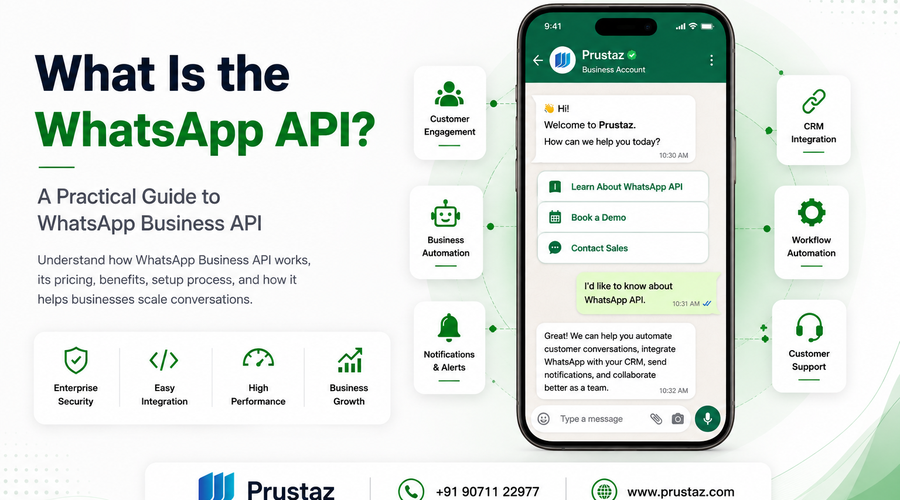
What Is the WhatsApp Business API?
Every growing business reaches a point where managing customer conversations through a single WhatsApp phone becomes inefficient. Sales teams need shared access, support teams need faster response times, and businesses want automation, CRM integration, and real-time notifications—all without compromising the customer experience. The WhatsApp Business API is designed to solve these challenges. It transforms WhatsApp from a simple messaging application into a secure business communication platform that integrates with your existing systems and helps teams manage conversations at scale. In this guide, we'll explain everything you need to know—from understanding the WhatsApp Business API and Meta's pricing model to choosing the right implementation approach and integrating it into your business workflows.
WhatsApp vs WhatsApp Business App vs WhatsApp Business API: What's the Difference?
Choosing the right solution depends on your team size, communication requirements, and long-term business goals. The comparison below highlights the key differences to help you make an informed decision.
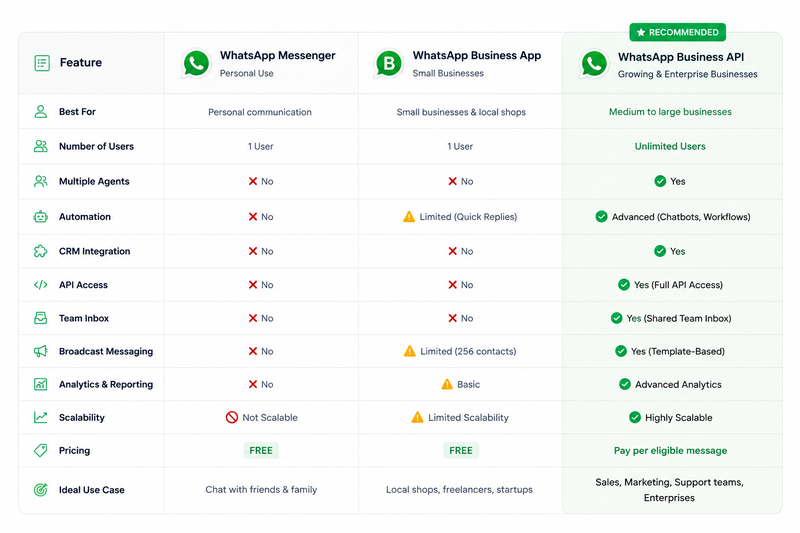
One of the biggest sources of confusion for businesses is understanding the difference between WhatsApp Messenger, the WhatsApp Business App, and the WhatsApp Business API. Although they all belong to the WhatsApp ecosystem, they are designed for different users and business needs. WhatsApp Messenger is built for personal communication, the WhatsApp Business App is ideal for small businesses managing customer conversations manually, while the WhatsApp Business API is designed for organizations that need automation, CRM integration, multi-agent support, and scalable customer engagement.
How to Get Access to the WhatsApp Business API?
Businesses use the WhatsApp Business API to automate customer communication, integrate WhatsApp with CRM systems, and manage conversations at scale. Unlike the WhatsApp Business App, the API is designed for medium and large businesses that need automation, multiple agents, and enterprise-grade integrations. It's a business communication platform provided by Meta that requires verification, configuration, and integration before you can begin sending messages at scale.
The setup process is straightforward when completed in the right order.
Step 1 : Create a Meta Business Account
The first requirement is a Meta Business Account. This serves as your organization's identity within Meta's ecosystem and is required to access the WhatsApp Business Platform.
During the account setup process, you'll typically need to provide the following information:
- Legal business name
- Business email address
- Official website
- Business address
- Company phone number
Ensure that the information matches your official business documents and website, as inconsistencies can delay the verification process.
Step 2: Complete Business Verification
Meta may ask you to verify your business by submitting documents such as:
- Business registration certificate
- Tax identification document (where applicable)
- Proof of business ownership
Business verification helps Meta confirm that your organization is legitimate. Once verified, you gain access to additional platform capabilities and build greater trust with customers.
Step 3: Register a WhatsApp Business Phone Number
The next step is to register the phone number you'll use with the WhatsApp Business API.
Before you continue, make sure the phone number:
- Can receive SMS or voice calls for verification
- Isn't already linked to a personal WhatsApp or WhatsApp Business App account
- Has been migrated or removed from WhatsApp if it's already registered
Using a dedicated business phone number helps keep customer conversations professional, separates business and personal communication, and makes managing your WhatsApp Business API account much easier as your business grows.
Step 4: Choose Your Implementation Method
There are two primary ways to access the WhatsApp Business API.
Option A: Use a Business Solution Provider : For most businesses, partnering with a Business Solution Provider (BSP) is the easiest and fastest way to get started. A BSP handles the technical setup and provides additional tools to help you manage customer conversations efficiently.
A typical Business Solution Provider (BSP) offers features such as:
- WhatsApp Business API access
- Shared team inbox
- CRM integration
- Chatbot capabilities
- Campaign management
- Analytics and reporting
- Technical support
Option B: Direct Integration with Meta Cloud API : For businesses with dedicated development resources, direct integration with the Meta Cloud API provides maximum flexibility and customization. However, it also requires the expertise to develop, secure, and maintain the integration.
With this approach, you'll be responsible for managing :
- API integration
- Webhooks
- Authentication
- Security
- Message processing
- Ongoing maintenance
Step 5: Create and Submit Message Templates
Businesses can't send free-form messages to customers outside the 24-hour customer service window. The customer service window begins when a customer sends your business a message. Outside this period, Meta requires businesses to use approved message templates to initiate conversations.
Message templates are pre-defined messages that are reviewed and approved by Meta before they can be used. They are grouped into three categories:
- Marketing – Promotions, offers, product launches, and campaigns.
- Utility – Order confirmations, invoices, appointment reminders, and shipping updates.
- Authentication – One-time passwords (OTPs), verification codes, and login confirmations.
Every message template must be submitted to Meta for review before it can be used. Meta evaluates templates for policy compliance, clarity, appropriate language, and correct message categorization. Once approved, the template becomes available for production use. If a template is rejected, you can revise the content and resubmit it for approval.
Step 6: Test Your WhatsApp Business API Setup
Before going live, thoroughly test your WhatsApp Business API implementation to ensure everything works as expected. Confirm that messages are delivered successfully, webhooks are received correctly, automated workflows execute as intended, CRM integrations synchronize customer data accurately, notifications are triggered at the right time, and approved message templates are sent without errors. Thorough testing helps identify issues early and ensures a smooth, secure, and reliable customer experience from day one.
Common Mistakes to Avoid :
- Using a personal WhatsApp number instead of a dedicated business number.
- Skipping Meta Business Verification.
- Submitting message templates with promotional content in Utility templates.
- Not testing webhooks before going live.
- Choosing direct integration without the necessary technical expertise.
- Ignoring customer opt-in requirements before sending marketing messages.
Setting up the WhatsApp Business API involves more than simply connecting a phone number. From Meta onboarding and business verification to message templates, integrations, and testing, every step plays an important role in building a secure and scalable customer communication platform. Whether you're implementing the API for the first time or expanding your existing communication strategy, following the right setup process helps ensure a smooth deployment and long-term success.
Unlock the Full Potential of the WhatsApp Business API
The WhatsApp Business API enables businesses to communicate with customers at scale through automated, secure, and personalized messaging. However, its true value goes far beyond sending and receiving messages. When integrated with your existing business applications, it becomes a centralized communication hub that streamlines customer interactions, automates workflows, and improves operational efficiency.
Whether you're managing sales inquiries, providing customer support, running marketing campaigns, or sending transactional notifications, integrating the WhatsApp Business API with your business ecosystem helps deliver faster, smarter, and more personalized customer experiences.
Why Business Integration Matters?
Using the WhatsApp Business API as a standalone messaging platform is suitable for basic communication. However, as customer conversations increase, managing them manually becomes challenging. Teams need access to customer information, conversation history, and automated workflows to respond efficiently.
By integrating the API with your business systems, customer conversations become part of a connected workflow rather than isolated chat messages.
What Can You Integrate with the WhatsApp Business API?
Businesses commonly integrate the WhatsApp Business API with CRM systems, ERP software, helpdesk platforms, e-commerce solutions, AI chatbots, marketing tools, and other business applications. These integrations help centralize customer communication, automate workflows, and improve team productivity.
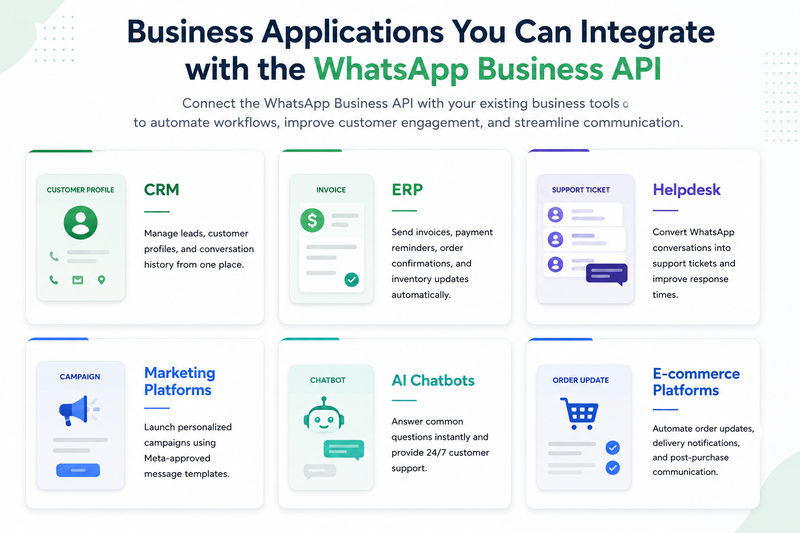
Benefits of WhatsApp Business API Integration
- Manage customer conversations through a shared team inbox.
- Access customer profiles and conversation history in one place.
- Automatically assign chats to the appropriate team member.
- Send order updates, appointment reminders, and notifications automatically.
- Automate repetitive customer interactions using chatbots.
- Track customer engagement and campaign performance.
- Improve collaboration between sales, support, and marketing teams.
Real-World Example
Imagine an e-commerce business receiving hundreds of customer inquiries every day.
Without integration:
- Customer conversations are managed manually.
- Teams switch between multiple applications.
- Order updates are sent individually.
- Customer information is difficult to track.
With the WhatsApp Business API integrated
- Sales and support teams access a shared inbox.
- Customer information is available instantly.
- Order confirmations and delivery updates are sent automatically.
- AI chatbots handle frequently asked questions, allowing support agents to focus on more complex issues.
The result is faster communication, improved customer satisfaction, reduced manual effort, and greater operational efficiency.
The WhatsApp Business API delivers the greatest value when it's integrated with the systems your business already uses. Whether it's a CRM, ERP, helpdesk, e-commerce platform, or AI chatbot, seamless integration enables faster communication, better customer experiences, and more efficient operations.
WhatsApp Business API Pricing in 2026
Understanding the WhatsApp Business API pricing model is essential before implementing it in your business. Unlike traditional software subscriptions, Meta doesn't charge a fixed monthly fee for API access. Instead, businesses pay based on the type of message they send and the country where the message is delivered.
Since July 1, 2025, Meta has adopted a per-message pricing model, replacing the previous conversation-based pricing system. This change provides greater pricing transparency and helps businesses estimate messaging costs more accurately. Because Meta periodically updates its pricing policies, always refer to the latest official pricing documentation before planning your messaging strategy.
How Does WhatsApp Business API Pricing Work?
Meta currently follows a per-message pricing model for business messaging. The amount you pay depends primarily on the message category and the recipient's country. Businesses using a Business Solution Provider (BSP) may also incur additional platform or service fees. The three primary message categories are
Marketing Messages :
Marketing messages are promotional communications used to engage customers with product launches, special offers, discounts, announcements, and marketing campaigns. These messages require Meta-approved templates and are billed according to Meta's pricing for the recipient's country.
Common examples include:
- Promotional offers
- Festival or seasonal campaigns
- New product launches
- Personalized recommendations
Utility Messages :
Utility messages support an existing customer interaction by providing important transactional information. They help keep customers informed throughout their purchase or service journey.
Common examples include:
- Order confirmations
- Shipping updates
- Payment receipts
- Appointment reminders
Authentication Messages :
Authentication messages verify a user's identity by sending secure verification messages. These templates are commonly used for account security and login verification.
Common examples include:
- One-Time Passwords (OTPs)
- Verification codes
- Login confirmations
- Password reset requests
Factors That Affect Pricing
Several factors influence your overall messaging cost:
- Recipient's country: Pricing varies based on the destination country.
- Message category: Marketing, Utility, and Authentication messages have different pricing.
- Business Solution Provider (BSP): Many BSPs charge additional platform, subscription, or support fees.
- Meta pricing updates: Meta periodically revises its pricing model and message rates.
- Message volume: Businesses sending large volumes of messages should regularly monitor their usage and costs.
Tip: When planning your WhatsApp messaging budget, include both Meta's messaging charges and your Business Solution Provider's fees to estimate the total cost of ownership more accurately.
Common Pricing Mistakes to Avoid
Many businesses underestimate the total cost of using the WhatsApp Business API. To avoid unexpected expenses:
- Don't assume Meta charges a monthly subscription fee.
- Don't overlook your Business Solution Provider's pricing.
- Use the correct message template category.
- Monitor messaging costs across different countries.
- Review Meta's latest pricing updates before launching campaigns.
Note : Before estimating your WhatsApp Business API costs, review Meta's latest pricing documentation and your Business Solution Provider's pricing structure. Understanding both will help you create a more accurate messaging budget and avoid unexpected expenses as your business grows.
Understanding the WhatsApp Business API pricing model helps businesses estimate costs more accurately and choose the right messaging strategy. By understanding message categories, recipient countries, Meta's pricing policies, and Business Solution Provider fees, businesses can better manage their messaging budget and avoid unexpected costs.
Whether you're implementing the WhatsApp Business API for the first time or optimizing an existing solution, understanding the pricing model is essential for controlling costs and maximizing customer engagement. At Prustaz, we help businesses simplify every stage of the implementation process—from Meta onboarding and pricing guidance to API integration, automation, and ongoing support.
Frequently Asked Questions (FAQs)
1. What is the WhatsApp Business API?
The WhatsApp Business API is a communication platform developed by Meta that enables businesses to send and receive messages at scale. Unlike the WhatsApp Business App, it supports multiple users, automation, CRM integration, chatbots, and business workflows, making it ideal for growing businesses and enterprises.
2. Is the WhatsApp Business API free?
Meta does not charge a monthly subscription fee for accessing the WhatsApp Business API. Instead, businesses pay based on eligible messages sent, with pricing varying according to the message category and the recipient's country. Additional charges may apply depending on your Business Solution Provider (BSP).
3. What is the difference between WhatsApp Business App and WhatsApp Business API?
The WhatsApp Business App is designed for small businesses that manage customer conversations manually from a single device. The WhatsApp Business API is built for businesses that need multiple users, automation, CRM integration, chatbots, analytics, and scalable customer communication.
4. How do I get access to the WhatsApp Business API?
To use the WhatsApp Business API, you'll need a verified Meta Business account, a business phone number, and a Business Solution Provider (BSP) or direct access through Meta's Cloud API. Most businesses choose a BSP because it simplifies setup, template management, and ongoing support.
5. Can I integrate the WhatsApp Business API with my existing software?
Yes. The WhatsApp Business API can be integrated with CRM systems, ERP software, helpdesk platforms, marketing automation tools, AI chatbots, and e-commerce platforms to automate communication and improve customer engagement.
6. Is the WhatsApp Business API suitable for small businesses?
Yes. While it is designed for scalable communication, small and medium-sized businesses can also benefit from features such as automation, shared team inboxes, customer notifications, and CRM integration as their customer base grows.
7. Why should businesses use the WhatsApp Business API?
The WhatsApp Business API helps businesses improve customer communication through automation, personalized messaging, multi-agent collaboration, and seamless integration with existing business systems. It enables organizations to respond faster, streamline operations, and deliver better customer experiences at scale.
Ready to Get Started?
The WhatsApp Business API is much more than a messaging platform—it's a powerful solution that enables businesses to automate customer interactions, streamline operations, and deliver faster, more personalized experiences at scale. Whether you're sending order updates, providing customer support, running marketing campaigns, or integrating WhatsApp with your CRM, ERP, or other business applications, the API helps create efficient, secure, and scalable communication workflows.
Successfully implementing the WhatsApp Business API, however, involves more than simply obtaining API access. From Meta Business verification and phone number registration to message template management, webhook configuration, system integrations, and ongoing maintenance, each step plays a vital role in building a reliable and scalable customer communication platform.
At Prustaz, we help businesses simplify every stage of the WhatsApp Business API journey. Whether you're getting started with the platform, integrating it with your existing systems, automating customer conversations, or developing custom workflows, our team provides end-to-end implementation, expert guidance, and scalable solutions tailored to your unique business requirements. With the right strategy and technology in place, you can unlock the full potential of WhatsApp to strengthen customer relationships, improve operational efficiency, and support long-term business growth.